3.5 KiB
Contributing
Developing
Development environment
Developing evcc requires Go 1.22 and Node 18. We recommend VSCode with the Go, Prettier and Vetur extensions.
We use linters (golangci-lint, Prettier) to keep a coherent source code formatting. It's recommended to use the format-on-save feature of your editor. You can manually reformat your code by running:
make lint
make lint-ui
Changing device templates
evcc supports a massive amount of different devices. To keep our documentation and website in sync with the latest software the core project (this repo) generates meta-data that's pushed to the docs and evcc.io repository. Make sure to update this meta-data every time you make changes to a templates.
make docs
If you miss one of the above steps Gitub Actions will likely trigger a Porcelain error.
Building from source
Install prerequisites (once):
make install-ui
make install
Build and run:
make
./evcc
Open UI at http://127.0.0.1:7070
To run without creating the evcc binary use:
go run ./...
Cross Compiling
To compile a version for an ARM device like a Raspberry Pi set GO command variables as needed, eg:
GOOS=linux GOARCH=arm GOARM=6 make
Publishing docker images
make docker DOCKER_IMAGE=my/docker DOCKER_TAG=0815
Debugging in VS Code
evcc Core
To debug a local evcc build in VS Code, add the following entry to your launch.json.
You can adjust the referred configuration as needed to e.g. use your live configuration.
{
    "name": "Launch evcc local build with demo config",
    "type": "go",
    "request": "launch",
    "mode": "auto",
    "program": "${workspaceFolder}",
    "args": ["-c", "${workspaceFolder}/cmd/demo.yaml"],
    "cwd": "${workspaceFolder}",
},
UI
For frontend development start the Vue toolchain in dev-mode. Open http://127.0.0.1:7071/ to get to the live reloading development server. It pulls its data from port 7070 (see above).
npm install
npm run dev
Integration testing
We use Playwright for end-to-end integration tests. They start a local evcc instance with different configuration yamls and prefilled databases. To run them, you have to do a local build first.
make ui build
npm run playwright
Simulating device state
Since we don't want to run tests against real devices or cloud services, we've build a simple simulator that lets you emulated meters, vehicles and loadpoints. The simulators web interface runs on http://localhost:7072.
npm run simulator
Run an evcc instance that uses simulator data. This configuration runs with a very high refresh interval to speed up testing.
make ui build
./evcc --config tests/simulator.evcc.yaml
Adding or modifying translations
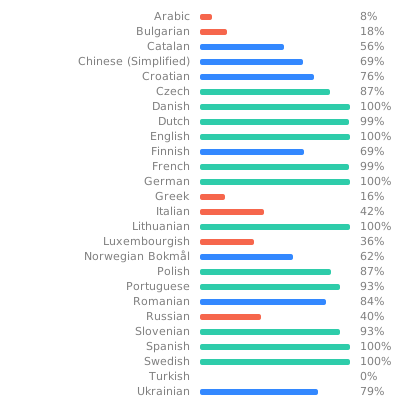
evcc already includes many translations for the UI. We're using Weblate to maintain translations. Feel free to add more languages or verify and edit existing translations. Weblate will automatically push all modifications to the evcc repository where they get reviewed and merged.